Pay securely with: MBWay, ATM, Credit Card, Paypal or Bank Transfer
Track your order from the moment it leaves for delivery until you receive it at your home.
The price of the products includes VAT at the current legal rate.
We offer refunds and/or exchanges within the first 14 days of your purchase. If 14 days have passed since the date of your purchase, you will not be offered a refund and/or exchange of any kind.
Anmite 10.5-inch Portable Monitor 1920x1280 - HDR, 100% sRGB, Low Blue Light, Type-C, for Gaming (Xbox, PS5, Switch), Mobile Phone and PC Extension
Expand your productivity and multiply the fun with the Anmite 10.5-inch Portable Monitor . This ultra-compact and lightweight portable screen (only ~300g) is the perfect solution for creating a dual setup anywhere, playing console games more immersively, or transforming your phone/tablet into a portable workspace.
With a crisp 1920x1280 (WUXGA) resolution in a taller 15:10 aspect ratio, it offers more vertical space for code, documents, or web browsing. The high-quality IPS panel with 100% sRGB coverage ensures vibrant and accurate colors, supported by HDR technology for greater contrast. The Low Blue Light function reduces eye strain during long sessions.
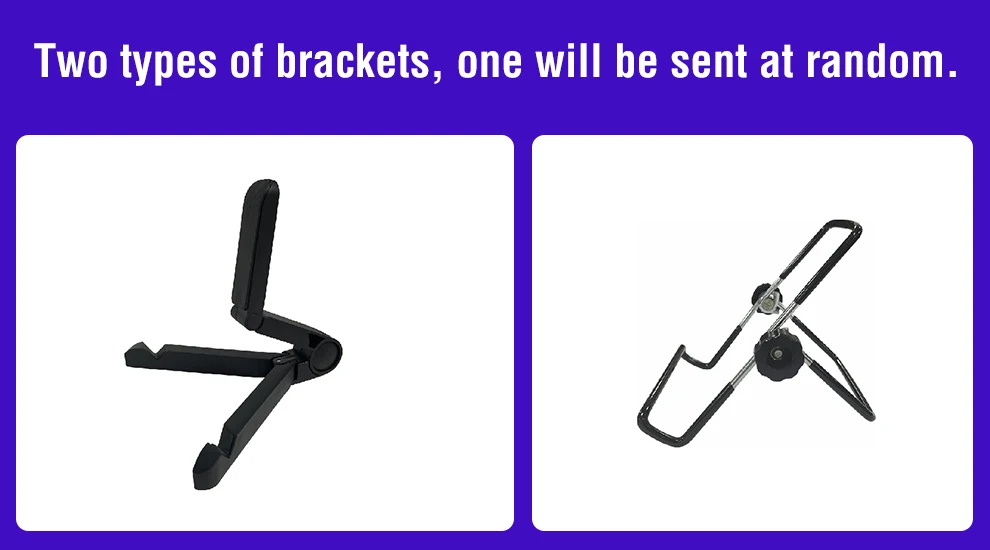
Connectivity is simple and universal with 2 USB-C ports (data + power) and a mini HDMI input , compatible with PCs, Macs, smartphones (desktop mode), Nintendo Switch, PlayStation, and Xbox. It includes a foldable stand and all necessary cables, making it truly plug-and-play.
Why choose the Anmite Portable Monitor?
Extreme Portability: Incredibly lightweight ( ~300g ) and thin, ideal for carrying in your backpack for travel, coworking, or coffee shops.
Superior Image Quality:10.5" IPS screen with 1920x1280 resolution , 100% sRGB , HDR , and Low Blue Light for reliable colors and visual comfort.
Universal Compatibility: Easily connects to PCs, Macs, smartphones, Nintendo Switch, PS5, Xbox Series X/S via USB-C or mini HDMI .
Complete Plug-and-Play Setup: Includes foldable stand , USB-C and mini HDMI cables – ready to use in seconds.
Multifunctional: Perfect as a second screen for work, console gaming, photo display, or as an extension of your mobile phone.
Technical Specifications:
Brand/Model: Anmite A105W01
Screen Size: 10.5 inches
Resolution: 1920 x 1280 pixels (WUXGA), 15:10 aspect ratio
Panel Type: IPS
Refresh Rate: 60Hz
Colors: 16.7 Million (8-bit), 100% sRGB
Technologies:HDR , Low Blue Light
Connectivity:2x USB-C (Full-featured: data, video, power), 1x Mini HDMI
Speakers: 2x Integrated Stereo
Power supply: Via USB-C port (can be powered by the source device or a power bank)
Weight: Approx. 300g (monitor only)
Includes: Monitor, Folding Stand, USB-C Cable, Mini HDMI Cable, USB Power Cable, Protective Carrying Case
Break free from the limitations of a single screen. The Anmite Portable Monitor is your extra window to the world, whenever and wherever you need it.
Monitor FAQ - Troubleshooting Common Problems
Q: The screen displays "blue no signal"
A: If you use a mobile phone to connect, you need to check whether the phone supports USB3.1 version output, whether it supports DisplayPort alternative mode (DP Alt Mode), and whether it supports MHL protocol mode. If not, it may be incompatible. You can use some converters for compatibility, such as: HD adapter cable. If not, it will display a blue no signal state. Please add a Mini HDMI to HDMI cable for signal transmission. If you use HDMI connection, you need to check whether your graphics card is connected correctly. As long as it displays blue no signal, it proves that there is no problem with the monitor, but there is no signal input. If there is a discrete graphics card, you must connect the discrete graphics card.
Q: Do I need to connect the power supply when using that?
A: The laptop uses It uses a TPYE-C connection cable and does not need to be plugged into a power source. If the power supply is insufficient, the screen will flicker and the USB will malfunction. A power supply is required. If you are using an HDMI connection, you must use USB power. supply. If the screen flickers, it may be insufficient power supply.
Q: What causes the screen flickering?
A: The screen flickering is caused by insufficient output or power supply of your device. It is recommended to use a 20W or higher PD power supply.
Q: Does it support vertical screen:
A: The monitor itself does not have the vertical screen function, so it does not support vertical screen. These functions can only be set on the mobile phone. THE monitor only provides display functions. Unless you set the mobile phone to computer mode or set the vertical screen on the computer, the monitor itself does not Vertical screen support.
Q: Does it support touch function?
A: This product is divided into non-touch versions. Please choose the corresponding model accordingly. to your needs to place an order to avoid purchasing the wrong model.
Q: My monitor cannot be turned on.
A: Please check whether the monitor and your device are in power-on mode. Definitely make the cable It is connected correctly. Connect other available devices or cables to verify.
If you use the USB-C interface connection: You can use the USB-C cable to obtain power. and signal transmission (one line for two purposes, also known as one line pass) and get power directly from the laptop. If you use the HDMI interface connection, You must use a two-wire connection solution. The HDMI cable is only responsible for this. for video signal transmission. You need an additional power supply solution. You can choose one of the following methods:
A1: Powered by a Power adapter connected to the socket (20W and above PD power is recommended)
A2: Powered from the computer USB through a separate USB cable (If the computer USB power supply is insufficient, false alarms such as insufficient brightness, flickering, black screen, etc. may occur. It is recommended to use a 20W and above PD power supply).
Q: Why is my screen flickering?
A: Please check if The connection is loose. If there is no problem with the connection, the screen flickering is caused by insufficient output of your device or power supply. It is recommended to use a 30W or higher PD power supply. Please connect the adapter and use it again, or try to replace new cables and devices.
Q: Why does the monitor generate an electrical current or Does it sound like rust?
A: Please confirm the source of the noise. If it is a connection noise, please re-plug the interface or replace a new cable. If it is the sound of the adapter or speaker, it may be due to the quality problem of the power adapter.
Q: Does this computer monitor support VESA wall mounting?
A: VESA Mount wall mount
Q: Is there a speaker?
A: Yes, with built-in speakers.
Q: Does it support Apple phones?
A: Basically no. As always, after testing, the iPhone 15 Pro and higher versions may be able to launch. screens, but they do not support vertical screen and touch functions.